

Brand originJapan
Supported

Supported
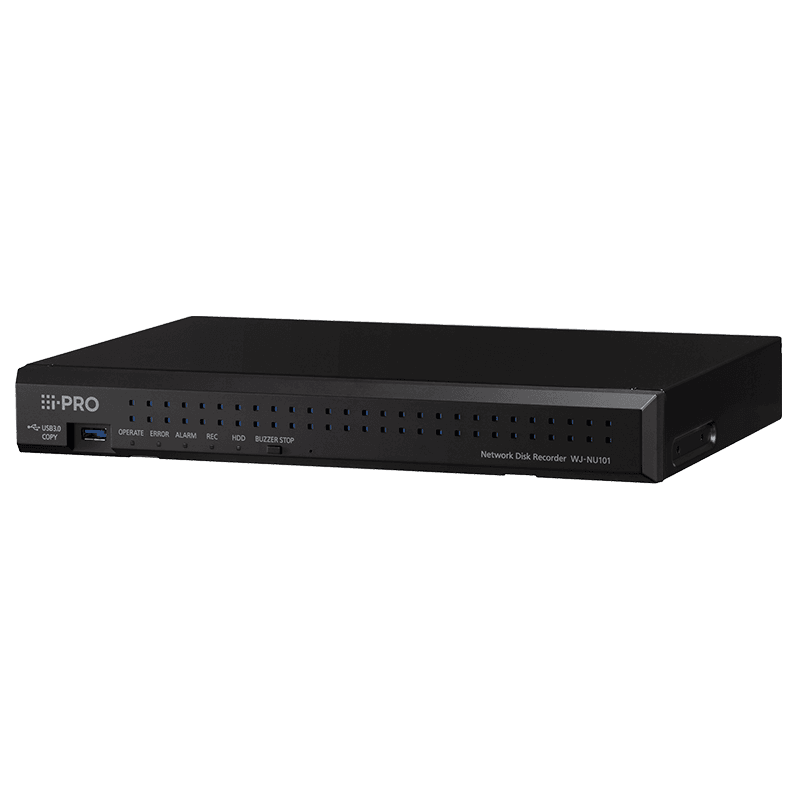
i-PRO WJ-NU101K
Category
Storage
First seen by Awernica
Oct 2026
Keep every device you have installed in one list – firmware, lifecycle and replacements. No card.
Software Support
Not specified
No published date
Replacement
Not specified
No verified replacement
On your sites?
Add to a site
Track firmware, EOL and replacements for every device you have installed – in one list.
Specifications
From the manufacturer's product information.
Supported Camera
- Compatible Vendor
- i-PRO series Network cameras, ONVIF NVT conformant camera and encoder
- Supported Image Format
- H.265(HEVC), H.264, JPEG
- Supported Image Resolution
- •Aspect ratio [4 : 3] 3072x2304, 2560x1920, 2048x1536, 1600x1200, 1280x960, 800x600, 640x480 •Aspect ratio [16 : 9] 3840x2160, 3328x1872, 3072x1728, 2688x1520, 2560x1440, 1920x1080, 1280x720, 640x360 •Aspect ratio [1 : 1] 2992x2992, 2816x2816, 2192x2192, 2048x2048, 1440x1440, 1280x1280, 1200x1200 •Aspect ratio [9 : 16] 2160x3840, 1872x3328, 1728x3072, 1520x2688, 1440x2560, 1080x1920, 720x1280, 360x640
- Supported Audio Format
- AAC-LC, G.711 for ONVIF
- Maximum Number of Cameras
- MAX. 4
Recording
- Recording Mode
- Event, Schedule, Emergency, Pre-event
- Pre-alarm Recording
- Up to 15 seconds *When the delivery speed from the network camera is less than 4 Mbps.
- Scheduled Recording Mode
- 4 programs, 6 time zones/day, Independent setup for each day of the week
- Frame Rate/Camera
- Up to 60 fps (Depending on the camera)
Main Unit Functions
- Camera Control
- Pan/Tilt, Zoom, Focus, Brightness, Preset position call and program (up to 256), Auto mode, Click centering, Wheel zoom, Zoom reset, Auto Back Focus, Aux, Wiper (for WV-SUD638)
- Multiscreen Mode
- [Main monitor] • Control screen 4 split screen display • Wide view screen 2 / 3 / 4 split screen display,1 screen sequence [Sub monitor] 1 screen sequence, 4 split screen display
- Playback Control
- PLAY, Rev PLAY, Pause, Stop, FF, FR, Prev Record, Next Record, Prev Image, Next Image, Go to Date, Go to Last (30 s), Time-saving playback
- Search Mode
- Search criteria : Time date, Playback by designating a timeline, VMD, Thumbnail
- Copy
- File Format: Original Format / MP4 Recorded data of selected cameras and time date range can be copied to USB storage.
- Camera Title
- Up to 16 Characters
- Clock Display
- Time : 12H/24H, Date : 5 formats
- Digital Zoom
- Live / Play: 1.25x 1.5x 1.75x, 2x, 2.5x, 3x, 3.5x 4x, 5x, 6x, 7x, 8x (only for 1-screen or 4-screen)
- System Log
- Operator access (500), Network error (100), Error (1,000), Event (1000), Operation (500)
- System Setup
- Setup page in English, French, Italian, Spanish, German, Portuguese, Thai, Vietnamese, Simplified Chinese, Traditional Chinese, Japanese
- 360 Camera Dewarp
- Only 1ch display mode.
- re-encoding
- 2Client
- SD Memory Data Download
- Images recorded in the SD card in the i-PRO series cameras can be transferred to the recorder automatically. (H.265/H.264)
Browser GUI
- Camera Control
- Pan/Tilt, Zoom, Focus, Brightness, Preset position call and program (up to 256), Auto mode, Zoom reset, Aux, Wiper (for WV-SUD638)
- Playback Control
- PLAY, Rev PLAY, Pause, Stop, FF, FR, Prev Record, Next Record, Prev Image, Next Image, Go to Date, Go to Last (30 s)
- Search Mode
- Search criteria : Time date, Event type, Camera number
- Display Mode
- 1 screen
- Image Download
- File Format: Original Format Recorded data of selected camera and time range can be downloaded to a PC. Viewer software can be downloaded separately.
- Copy
- File Format: Original Format / MP4 Recorded data of selected cameras and time date range can be copied to USB storage.
- Camera Title
- Up to 16 characters
- Clock Display
- On the browser. Time: 12H/24H, Date: 5 formats
- Alarm Control
- Reset
- System Log
- Operator access (500), Network error (100), Error (1,000), Event (1000), Operation (500)
- GUI Language
- English, French, Italian, Spanish, German, Portuguese, Thai, Vietnamese, Simplified Chinese, Traditional Chinese, Japanese
- Required PC
- CPU: Intel® Core™ i7-860 or faster, RAM : 4 GB or more, VRAM: 128 MB or more (Min. 64 MB), Microsoft® DirectX® 9.0c or later
- Web Browser
- Microsoft Edge*, Google Chrome, Mozilla Firefox *Not compatible with Internet Explorer mode
Alarm/Event
- Alarm Source
- 4x Terminal inputs, 4x Camera alarms (TCP alarm notification), 128x Command alarms
- Event Mode
- Off / On
- Alarm Action
- Alarm recording, E-mail notification, Alarm message, Camera positioning, Terminal output, TCP/HTTP alarm notification output, Buzzer, Indicator
- Alarm Control
- Reset
- Event log
- 1000
Input/Output
- Monitor (HDMI) Connector
- [Main monitor] HDMI 4K UHD(3840x2160p)/30Hz, 4K UHD(3840x2160p)/25Hz, 1920x1080p /60Hz, 1920x1080p /50Hz [Sub monitor] HDMI 1920x1080p /60Hz, 1920x1080p /50Hz
- Alarm/Control Terminal
- [Alarm] Alarm input 4, Alarm output 1 [Control] +5 V output, Emergency recording input, General purpose input/output [Error / Warning] HDD error / Recording error output, Camera error output
- Mouse Connection Port
- 1 (USB 2.0)
- Network Port (PC)
- 1x 10BASE-T / 100BASE-TX / 1000BASE-T (RJ45)
- Network Port (Camera)
- 4x 10BASE-T / 100BASE-TX(RJ45), (RJ45, PoE+), PoE Budget (4 port Total : Max 50 W, Each port Max : 30 W)
- USB Storage
- USB 3.0 / USB 2.0 memory, USB 3.0 / USB 2.0 connected HDD (except bus powered device)
Network
- Network Interface
- 10BASE-T / 100BASE-TX / 1000BASE-T (RJ45)
- Maximum Recording Rate
- 48 Mbps
- Maximum Bandwidth
- Total 96 Mbps
- Supported Protocol
- IPv4: TCP/IP, UDP/IP, HTTP, HTTPS, SMTP, DNS, NTP, SNMP, RTP, RTSP, ICMP, ARP IPv6: ICMPv6
- Upon Alarm or Warning
- No. of Simultaneous Users
- 16 or less
- User Registration
- Up to 32 users
- User Level
- 3 Levels (Programmable)
- Partitioning
- User level - Camera (View & Control, No Access)
- Security Method
- User authentication (ID and Password), Host authentication, Alteration detection, SSL/TLS
Other Functions
- Time Synchronization
- NTP (Server/Client)
- Summer Time
- User definable (using menu setup)
- Remote Monitoring (Cloud service for P2P)
- 1000 cameras or less Allows the PC and mobile APP full access the multiple NU series / NX series NVRs.
HDD
- Type
- 3.5 inch
- Maximum Capacity
- 24 TB
Viewer Software
- Playback Control
- PLAY, Rev PLAY, Pause, FF, FR, Prev Record, Next Record, Prev Image, Next Image
- Additional Functions
- [NX Viewer] Alteration detection, Save as JPEG, Two times zoom, Print, Copy, Aspect ratio switching, fish eye correction, corridor display
- Supported OS, Language
- Language of the software will be English or Japanese
General Specifications
- Safety / EMC Standard
- UL (UL62368-1) c-UL (CAN/CSA C22.2 NO.62368-1) FCC (FCC Part15 Subpart B)
- Power Source
- DC 54 V 1.67 A (included AC power adapter)
- Power Consumption
- 90 W (DC 54 V 1.67 A)
- Ambient Operating Temperature
- Main body : 0 °C to +45 °C (32 °F to 113 °F) Mouse (provided) : +5 °C to +40 °C (41 °F to 104 °F) AC power adapter (provided) : 0℃to+40℃ (32°F to 104°F)
- Ambient Operating Humidity
- 5 % to 90 % (without condensation)
- Maximum Operating Altitude
- 2,000 m (6,562 feet) above sea level
- Dimensions
- 340 mm(W) x 44 mm(H) x 230 mm(D) {13-3/8 inches (W) x 1-23/32 inches (H) x 9-1/16 inches (D)}
- Mass (approx.)
- App 2.1 kg {4.6 lbs}
New here?
Awernica keeps your installed devices and systems up to date.
- Firmware & end-of-life tracking
- Cross-manufacturer spec search
- Site lists and equipment plans
- Earn Credits – unlock Pro tools without paying
No card · 7-day Pro trial included
See a real site first